




There’s a new scam to look out for in a place you wouldn’t expect.
Security experts at the Identity Theft Resource Center (ITRC) are warning about a rise in “CAPTCHA scams,” a growing threat that weaponizes the little checkbox meant to protect consumers and keep bots out.
Instead of protecting websites and verifying that users are human, the scam prompts are being used to trick people into enabling scams and malware.
Users will end up on a webpage, likely through a misleading ad, suspicious download link or pirated content site, and they’ll immediately be presented with what appears to be the standard human verification test.
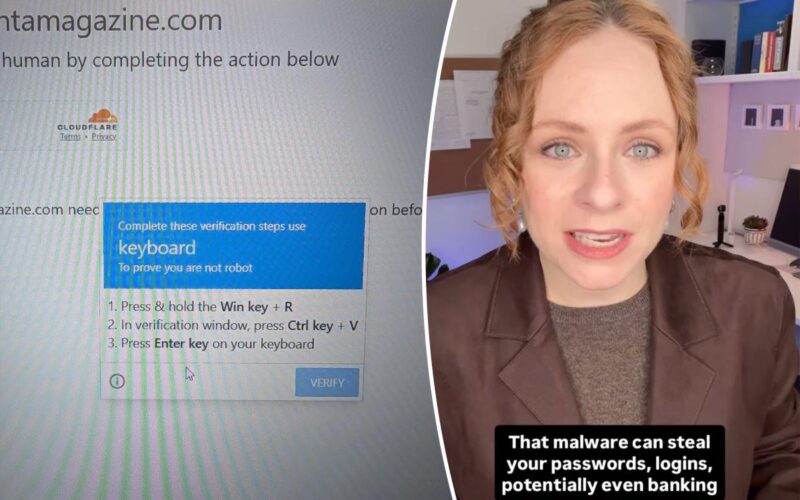
But rather than simply checking a box and/or selecting images, the page will ask users to take additional steps, like clicking “Allow” on a browser notification request, or copying and pasting a command into their system.
Clicking “Allow” can inundate the user’s device with scam notifications, such as fake virus alerts, phishing links or fraudulent offers. In some cases, following the instructions can lead to the installation of malicious software.
The website might tell you there’s an error and provide these “simple” steps to fix it, such as pressing a specific sequence of keys on your keyboard, like the Windows Key + R, then Ctrl + V.
When this happens, the commands prompt the computer to open a hidden command box, paste in a “script” that the attacker wrote and run that script, which downloads a virus onto the computer.
Unlike traditional phishing scams, CAPTCHA scams — which have been seen on both desktop and mobile browsers — tend to rely on compromised advertising networks or chains that redirect users to malicious pages without a clear warning sign.
Part of the reason why so many people fall for these scams is that CAPTCHA prompts usually appear when users are trying to access something quickly, and the urgency pushes caution out the window.
Plus, a fake CAPTCHA looks like a legitimate prompt, which doesn’t flag that one should be suspicious of it.
Experts have emphasized that real CAPTCHAs will never ask users to enable browser notifications, run commands, use keyboard shortcuts or download additional software. If a site asks you to open a “Run” box or paste a code, it’s a scam.
Consumers are advised to avoid interacting with suspicious prompts and to promptly close any webpage that seems odd.
It’s also important to keep browsers updated, use ad blockers and review notification permissions to reduce exposure to these scams.
If you followed the prompts and think your computer might have been impacted, the ITRC notes not to panic — but act fast.
They advise turning off Wi-Fi or unplugging your internet cable to “cut the line” so the criminal can’t send your data back to their server.
Using a different device, change the passwords for any account where you use the same or similar passwords, and don’t use the same password on more than one account.
It’s advised to run a full scan with a trusted antivirus program as well, and check any bank statements for charges you don’t recognize.